Rounded Squares: A Dingbats Font with Personality
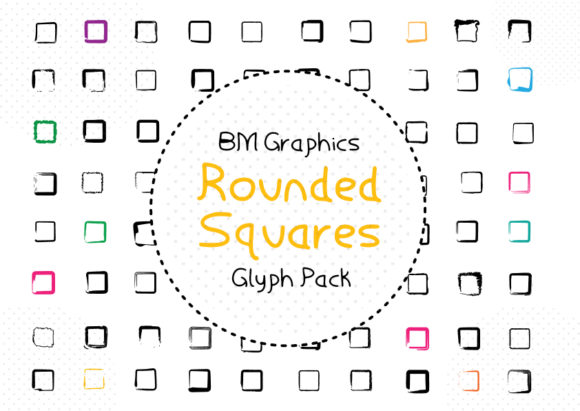
When you need a visual accent that feels both modern and approachable—something that adds quiet intention without shouting—Rounded Squares often fits just right. It’s not a text font for body copy or headlines. Instead, it’s a carefully crafted dingbats font containing 81 distinct glyphs, each built from softly curved squares. That subtle geometry—neither rigid nor overly organic—gives it versatility few symbol fonts achieve.
Why a Dingbats Font Like Rounded Squares Still Matters
In an age of stock icons and AI-generated assets, hand-crafted symbol sets retain quiet authority. Rounded Squares stands out because its glyphs aren’t abstract shapes pulled from a template—they’re balanced, consistent, and intentionally restrained. Each glyph shares the same corner radius, weight, and spatial rhythm. That cohesion means when you drop three or four into a layout, they read as a unified system—not a collage.
This matters most when clarity and tone are equally important: a workshop handout where bullet points need warmth, a newsletter divider that shouldn’t distract, or a branding element that reinforces calm confidence without cliché. Rounded Squares doesn’t compete with your message—it frames it.
Real Projects Where Rounded Squares Adds Quiet Value
Educators and course designers use Rounded Squares to mark section transitions in digital workbooks or printed guides. A simple square-with-dot glyph (one of the 81) works as a clean “next step” indicator—more distinctive than a standard arrow, less busy than a custom illustration. Because all glyphs scale evenly, it stays legible at 12 pt in a PDF or 48 pt on a slide.
Freelancers and small business owners often build their own proposals, service pages, or social media templates. Rounded Squares offers a way to inject brand-aligned visual language without hiring a designer. Pairing a custom icon—say, a rounded square with a checkmark or pencil—with short benefit statements creates scannable, trustworthy content. It signals attention to detail, even in lean workflows.
Bloggers and content creators find it especially useful for visual hierarchy in long-form posts. Instead of defaulting to generic bullets or emoji (which vary wildly across devices), Rounded Squares delivers consistent, neutral-but-friendly markers. One creator uses the “square with arrow loop” glyph to introduce recurring tips; another applies the “square with leaf” to sustainability-focused sections—small choices that make content feel more intentional over time.
How It Supports Creative Efficiency—Without Compromise
You don’t need design software expertise to use Rounded Squares well. It installs like any font and works in Pages, Google Docs, Keynote, Figma, and Adobe apps. No SVG imports, no licensing checks per platform—just type, select, resize. That simplicity saves time when you’re iterating fast: drafting a pitch deck, updating a client presentation, or prepping a workshop handout.
More importantly, it reduces decision fatigue. When you have 81 thoughtful options—not thousands of loosely related icons—you spend less time searching and more time refining meaning. You might choose the “square with open book” for resource links and the “square with gear” for technical notes—not because they’re flashy, but because their forms support quick recognition *in context*.
Who Benefits Most—and Why
The people who gain the most from Rounded Squares tend to share two traits: they value consistency over novelty, and they work across multiple formats (print, web, presentation). That includes:
- Small business owners building cohesive brand touchpoints without a style guide;
- Educators creating accessible, repeatable learning materials;
- Freelance designers who want to offer clients subtle typographic distinction without custom illustration;
- Content strategists structuring complex information in ways readers navigate intuitively.
It’s less ideal for projects needing photorealistic icons, multilingual symbol sets, or highly technical schematics. If your work relies heavily on industry-specific glyphs (e.g., electrical diagrams or musical notation), Rounded Squares won’t replace those tools—but it may still serve as a complementary layer for navigation or framing.
Thoughtful Use Starts With Intentional Selection
Because Rounded Squares contains exactly 81 glyphs—not 200, not 50—the set invites curation. You’re not scanning endless options; you’re choosing which symbols best reinforce meaning *in your specific context*. That constraint is a feature, not a limitation. One educator told us she prints a cheat sheet of her top 12 glyphs and keeps it next to her laptop—“It reminds me to be deliberate, not decorative.”
Try this: open your current project, identify one place where a visual marker could improve flow or tone, then test three different Rounded Squares glyphs at the same size and weight. Notice how each shifts emphasis—even slightly. The “square with plus” feels additive and open; the “square with minus” reads as refined or focused; the plain rounded square alone can act as elegant visual breathing room. These distinctions matter in how readers absorb information.
A Note on Fit and Compatibility
Rounded Squares performs best when used at medium-to-large sizes (16 pt and up in print, 24 px+ on screen) and with generous spacing. Its strength lies in clarity, not density. Avoid cramming too many glyphs into tight layouts—let them breathe. Also, while it supports Latin-1 and basic Unicode ranges, it’s not a multilingual text font. Use it for symbols only, alongside your primary text typeface.
If you regularly need symbols that communicate action verbs (“share,” “save,” “edit”), consider pairing Rounded Squares with a simple sans-serif for labels. The contrast between geometric softness and clean typography often strengthens readability—especially in UI mockups or instructional graphics.
Final Thought: Tools Shape Tone, Often Quietly
Most readers won’t name Rounded Squares—but they’ll respond to the coherence it brings. That’s the quiet power of a well-made dingbats font. It doesn’t demand attention; it earns trust through restraint. Whether you’re designing a client report, formatting a syllabus, or building a personal portfolio, having a set of symbols that feel both grounded and gently distinctive makes decisions easier and outcomes more polished.
And because it’s purpose-built—not algorithmically generated—you’re not just adding decoration. You’re choosing a visual language with care. That intention shows, even when it goes unnamed.