Mayhena: A Vintage Monoline Font That Delivers Clarity—If You Use It Right
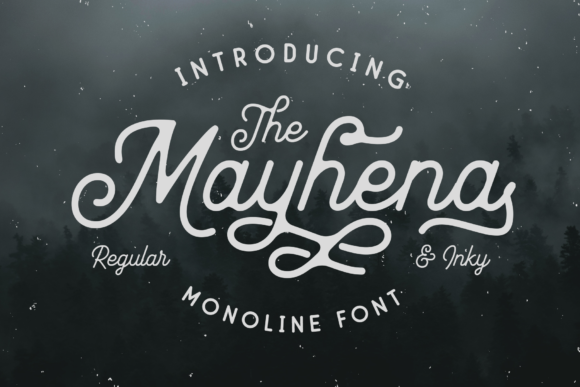
Mayhena stands out in a crowded font landscape—not with flashy effects or dozens of weights, but with quiet confidence. It’s a connected monoline typeface inspired by mid-century handwriting and sign painting, offering just two distinct styles: Regular and Inky. That minimalism is its strength—but also where many designers unintentionally misstep.
Why Mayhena Appeals—and Why That Can Be Misleading
Its vintage charm makes Mayhena an instant favorite for café menus, boutique packaging, wedding stationery, and handcrafted brand identities. The smooth, rhythmic connections between letters lend warmth and personality without sacrificing legibility at medium sizes. But here’s what often gets overlooked: Mayhena isn’t built for everything. Its connected nature means it shines in short-form, intentional settings—not dense paragraphs, legal disclaimers, or mobile app interfaces.
Beginners sometimes assume “vintage” equals “versatile.” They drop Mayhena into a blog header, then try to use it for body text—and wonder why readers scroll past or miss key details. Professionals may choose it for a client’s logo, only to realize later that the Inky variant doesn’t render reliably in email clients or older PDF viewers. These aren’t flaws in Mayhena—they’re mismatches between expectation and application.
1. Assuming “Connected” Means “Automatic Readability”
Because Mayhena’s letters flow into one another, some users expect it to read effortlessly at any size or context. In reality, connected scripts require careful spacing, generous line height, and thoughtful contrast. At 14px on screen—or worse, in low-resolution print—the joins can blur, turning “handwritten charm” into “illegible tangle.”
Better approach: Reserve Mayhena for display use: headlines (36px+), pull quotes, signage, and social graphics. For supporting text, pair it with a clean, neutral sans-serif like Inter, Lato, or even Georgia. Test readability by stepping back three feet from your screen—or better yet, ask someone unfamiliar with the design to read it aloud.
2. Overlooking Rendering Differences Between Regular and Inky
The Inky variant adds subtle texture and weight variation—great for tactile appeal in print or high-DPI digital assets. But that same texture can cause inconsistent hinting on Windows systems or older iOS versions. You might see uneven stroke rendering, faint gaps between letters, or unexpected boldness in certain browsers.
Better approach: Use Inky intentionally—not interchangeably. Apply it where texture enhances meaning: a limited-edition product label, a physical invitation, or a hero section background image (not live text). For web text, stick with Regular unless you’ve tested Inky across Chrome, Safari, Firefox, and Edge—and confirmed fallback behavior via @font-face declarations.
3. Skipping Licensing Checks Before Commercial Use
Mayhena is available through reputable foundries and marketplaces—but not all licenses cover the same uses. Some free downloads include personal-use-only terms. Others allow web embedding but restrict app bundling or merchandise resale. One freelancer assumed their $29 purchase covered unlimited client projects—only to receive a polite but firm notice after using Mayhena in a Shopify theme sold to 200+ stores.
Better approach: Before downloading or purchasing, scan the license summary—not just the marketing copy. Look for clear language around web fonts, desktop use, app embedding, and merchandise. When in doubt, contact the vendor directly. Reputable sellers respond quickly and clarify scope without upselling.
What to Check Before You Commit
Before adding Mayhena to your next project, ask yourself these five questions:
- Is this text meant to be read—or recognized? Logos, titles, and callouts thrive with Mayhena. Long-form content needs structure Mayhena doesn’t provide.
- Will this appear across devices and platforms? If yes, preview how Regular renders on Android Chrome, iOS Safari, and Windows Edge—not just your Mac.
- Does my workflow support OpenType features? Mayhena includes standard ligatures and contextual alternates. If your CMS or design tool strips those (many do), you’ll lose part of its character.
- Do I have a fallback plan for accessibility? Screen readers handle connected fonts fine—but color contrast, font size, and spacing still matter. Ensure your Mayhena headline meets WCAG 2.1 contrast ratios when paired with its background.
- Have I tested real content—not just “The quick brown fox”? Try actual headlines or taglines. Phrases with repeated letters (“bookkeeping,” “coffee cup”) or tight combinations (“fi,” “fl”) reveal spacing quirks no specimen sheet shows.
Real-World Examples: What Works (and Why)
A local bakery used Mayhena Regular for its chalkboard-style menu board—paired with a light gray sans-serif for prices and ingredients. Result: warm, inviting, instantly scannable. They avoided Inky there because humidity warped the printed vinyl, exaggerating ink bleed.
A freelance educator chose Mayhena Inky for her course workbook cover—then switched to Regular for chapter titles inside. Why? Inky added richness at large scale, but Regular ensured consistent spacing across 87 pages of varying paper stocks and printer calibrations.
A small e-commerce brand tried using Mayhena for product names on mobile. Bounced rate spiked 22% in A/B testing. They pivoted to Mayhena Regular at 24px for product cards—and kept body text in a system font. Conversion recovered, and customer feedback noted the “friendlier, more human feel” without sacrificing speed or clarity.
Final Thought: Respect the Design, Not Just the Aesthetic
Mayhena isn’t a shortcut to “vintage vibes.” It’s a deliberate tool—one that rewards attention to context, constraints, and craft. Its simplicity invites misuse, but its consistency rewards care. Whether you’re sketching a logo on paper or coding a responsive landing page, let Mayhena serve the message—not the other way around. Choose it when connection matters. Step back when clarity demands space. And always test—not assume.