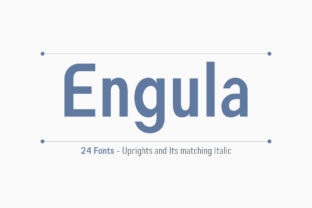
Engula: A Versatile Sans Serif Font Family
Engula is an extraordinary sans serif font family designed for clarity, flexibility, and expressive typography. With 24 carefully crafted fonts—12 upright styles and 12 matching italics—it offers a rare balance of consistency and nuance. Whether you're drafting a blog post, designing a logo, or preparing classroom materials, Engula gives you room to breathe, adapt, and communicate with intention.
What Makes Engula Stand Out?
Unlike many sans serifs that prioritize minimalism at the expense of personality, Engula combines clean lines with subtle warmth. Its letterforms feature gentle curves, open counters, and even spacing—details that improve readability across screens and print. The range spans from delicate Hairline to commanding Black, with weights like Regular, Medium, SemiBold, and Bold all calibrated to work harmoniously together.
The inclusion of 12 matching italics isn’t just decorative—it means real typographic hierarchy. You can use Engula Italic Light for soft captions and Engula Italic Bold for pull quotes without breaking visual flow. That level of cohesion saves time and strengthens design decisions, especially when you’re juggling multiple formats or collaborating with others.
Who Benefits Most From Engula?
Beginners appreciate how intuitive Engula feels: no steep learning curve, no confusing naming conventions. Just pick a weight and go. For educators, its high legibility supports students of all ages—especially helpful in presentations, handouts, or digital learning platforms. Freelancers and small business owners find it ideal for branding that’s professional yet approachable: think café menus, service websites, or Instagram graphics that reflect authenticity, not sterility.
Bloggers and marketers value Engula’s versatility in long-form content. Its Regular and Medium weights support comfortable reading on mobile and desktop alike, while bolder variants add emphasis without shouting. Designers love pairing Engula with a thoughtful serif for contrast—or using it solo for a modern, unified aesthetic.
Real-World Uses You’ll Recognize
- Websites & Apps: Use Engula Regular for body text and Engula SemiBold for headings—no custom line-height tweaks needed. Its generous x-height ensures crisp rendering even at small sizes on retina displays.
- Presentation Slides: Swap generic system fonts for Engula Bold and Italic to elevate your pitch decks. Subtle differences in weight and slant help guide attention naturally—no extra animations required.
- Printed Materials: From event flyers to product packaging, Engula’s ink-friendly shapes reduce smudging and maintain clarity at low resolutions or on textured paper.
- Social Media Graphics: Create cohesive brand assets across platforms using consistent weights—Engula Light for minimalist quote cards, Engula Black for bold announcement banners.
- Educational Resources: Teachers use Engula Medium in worksheets because its open letterforms (like ‘a’, ‘e’, and ‘g’) support early readers, while older students respond well to its clean, uncluttered style in study guides and infographics.
Why Typography Choice Matters More Than You Think
Your font quietly shapes how people feel about your message—even before they read a word. A rushed, mismatched type pairing can make content feel unreliable or hard to trust. Engula avoids that by offering reliable contrast, predictable behavior across devices, and built-in typographic rhythm. That reliability builds credibility, especially for entrepreneurs launching their first website or freelancers submitting proposals.
It’s also accessible by design: generous letter spacing, clear distinctions between similar characters (like ‘I’, ‘l’, and ‘1’), and strong color contrast in rendered text support screen readers and users with visual preferences. This isn’t just “nice to have”—it’s part of responsible communication.
Things to Keep in Mind Before You Start
Engula is a premium font family, so licensing matters. Check whether your intended use—commercial website, client project, or internal document—requires a specific license tier. Most providers offer web, desktop, and app licenses separately, and some include free trials or limited-use versions to test compatibility.
While Engula performs beautifully across browsers and operating systems, always preview how it renders on common devices. Some lighter weights may appear too thin on older Android screens, for example—so consider testing Engula Medium as a safe default for body copy if broad accessibility is critical.
You don’t need design software expertise to use Engula well. Many platforms—including Canva, Figma, Adobe Creative Cloud, and WordPress themes—support custom font uploads or integrations. If you’re using it on a website, modern variable font options (where available) let you adjust weight and width dynamically—reducing file size and increasing responsiveness.
A Note on Pairing and Restraint
Because Engula covers such a wide range—from whisper-thin to boldly assertive—you rarely need to pair it with another sans serif. In fact, over-pairing can dilute its strength. Instead, try letting Engula do the heavy lifting: use one weight for headings, another for subheads, and its italic counterpart for emphasis or attribution. That simplicity often reads as more confident and intentional than complex combinations.
If you do choose to pair it with a serif, opt for something with moderate contrast and neutral proportions—think Merriweather or Lora—not ultra-thin or highly decorative fonts that compete for attention.
Getting Started Is Simpler Than You Expect
Download a trial version and open it in any text editor or design tool. Type a few sentences. Adjust the weight. Toggle italic on and off. Notice how the rhythm changes—not dramatically, but meaningfully. That’s the sign of a thoughtfully built type family.
For bloggers, start with Engula Regular for posts and Engula SemiBold for titles. For small business owners building a new site, apply Engula Medium across navigation, buttons, and paragraphs—then introduce Engula Bold only where action is needed (“Get Started”, “Contact Us”). These small, intentional choices add up to a stronger, more memorable presence.
Typography isn’t about perfection—it’s about connection. Engula makes that connection easier, clearer, and more human. Whether you’re writing your first newsletter or refining a decade-old brand identity, it’s a tool that grows with you, not one that demands constant adjustment.