Delilah: A Script Font That Elevates Intentional Design
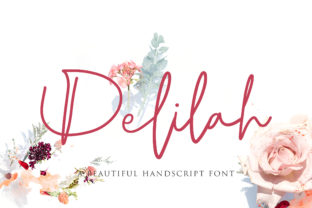
Delilah is a stunning script font—fluid, expressive, and meticulously crafted—that transforms how creators communicate tone, personality, and polish. It’s not just decorative; it’s functional typography designed to support clarity and emotional resonance in real-world projects. Whether you’re designing a wedding invitation, refining a brand identity, preparing a pitch deck, or publishing an e-book, Delilah fits naturally into workflows where voice matters as much as content.
Where Delilah Fits in the Creative Process
Typography isn’t applied at the end—it shapes decisions from the start. Delilah works best when introduced early in the planning phase, not as an afterthought. For example, when a small business owner begins developing a new product line, choosing Delilah during mood board creation signals a commitment to elegance and approachability. That decision then informs color palette choices, photography style, and even copy tone—creating alignment across assets before a single pixel is placed.
During execution, Delilah serves as both a guide and a guardrail. Its natural rhythm encourages concise, human-sounding headlines and taglines. When used for callouts in a presentation or section headers in a course workbook, it subtly directs attention without shouting. And because its letterforms carry inherent warmth, it softens technical or dense material—making educational content feel more inviting, or financial reports feel more personal.
Practical Integration Across Tools and Platforms
Delilah is a desktop font (OTF and TTF), meaning it installs directly into your operating system and becomes available in any design or word-processing application—Adobe Creative Cloud, Affinity Suite, Canva (via upload), Microsoft PowerPoint, Google Docs (with add-ons like Extensis Fonts), and even Figma (using the Font Installer plugin). Compatibility is broad, but consistency requires intention.
For teams, installing Delilah on shared devices—or using cloud-based font management tools like Adobe Fonts—ensures version control and prevents substitution errors. If you're collaborating with a freelance designer or handing off files to a printer, embed Delilah in PDF exports and include fallback instructions (e.g., “If Delilah is unavailable, use a light-weight script with similar x-height and spacing”). This protects visual integrity without requiring everyone to own the license.
On the web, Delilah can be self-hosted via @font-face in CSS. Because it’s a variable-weight script (with optional stylistic alternates), it supports nuanced hierarchy—light for delicate subheads, regular for primary headings, and connected variants for monogram treatments. Just remember to serve only the weights and character sets you actually use; unused glyphs increase load time unnecessarily.
Workflow Examples You Can Adapt Today
- Bloggers & Educators: Use Delilah for article titles and pull quotes—not body text. Pair it with a clean, highly legible sans-serif (like Inter or Source Sans Pro) for paragraphs. This contrast reinforces structure: Delilah draws the eye and sets the mood; the sans-serif delivers information efficiently.
- Small Business Owners: Apply Delilah consistently to one key asset per campaign—e.g., the logo lockup on packaging, the “Thank You” card inside orders, or the headline on a seasonal email banner. Repetition builds recognition; restraint prevents visual fatigue.
- Freelancers & Designers: Include Delilah in your proposal templates—not as default body type, but as part of a branded header or signature block. It signals craftsmanship before the first meeting, reinforcing your positioning as detail-oriented and client-focused.
- Event Planners & Creatives: Build a Delilah-based “style anchor”: a single A5 print sample showing how the font appears on textured paper, with ink bleed notes and recommended sizing. Share this with printers, stationers, and clients to align expectations—and avoid last-minute revisions.
Preparation, Usability, and Long-Term Fit
Before deploying Delilah, test readability at intended sizes. Its connecting strokes and subtle flourishes shine at 24pt and above—but shrink below 16pt, and legibility drops quickly. For mobile interfaces or small-print materials (like ingredient labels or footnotes), switch to a supporting typeface. That’s not a limitation—it’s a signal to respect context.
Organization matters, too. Keep Delilah in a dedicated folder labeled by project stage (“Delilah – Branding,” “Delilah – Print Assets”) rather than generic “Fonts.” Name files clearly: Delilah-Regular-Web.woff2, Delilah-AltSwash-Print.otf. Over time, this habit saves hours during audits, rebrands, or handoffs.
Efficiency increases when you standardize usage rules. For instance: “Delilah is used only for display text—never for data tables, form fields, or navigation menus.” Or: “All Delilah headings include OpenType stylistic set 2 (SS02) for alternate ‘a’ and ‘g’ forms.” Clear boundaries reduce decision fatigue and maintain visual cohesion across months or years.
Quality Control and Consistency Checks
Because script fonts invite expressive interpretation, small inconsistencies compound fast. A common issue? Inconsistent baseline alignment when mixing Delilah with other typefaces. Always check vertical metrics in your design tool—especially if layering Delilah over imagery or within multi-line buttons. Use guides or plugins like Adobe’s Glyphs panel to preview kerning pairs and adjust tracking manually where needed (e.g., “T” + “o” may need slight tightening).
For printed work, order physical proofs before full runs. Screen rendering smooths edges; press output reveals subtleties—like how Delilah’s fine hairlines hold up on uncoated stock versus glossy. Likewise, test on multiple devices if used digitally: some Android browsers render OpenType features inconsistently, so verify fallback behavior.
Long-term, revisit your Delilah usage every 6–12 months. Ask: Does it still reflect who you are or what you offer? Has audience feedback hinted at misalignment—e.g., “feels too formal for our wellness brand”? Fonts evolve with your work. Keeping Delilah intentional—not automatic—ensures it remains a strategic asset, not just a stylistic habit.
Realistic Expectations and Smart Pairings
Delilah doesn’t replace strategy—it clarifies it. It won’t fix weak messaging, compensate for poor layout, or mask low-resolution images. But when paired with strong writing, thoughtful spacing, and purposeful color, it amplifies impact. Think of it like a well-tuned instrument: essential in the right ensemble, overwhelming if overused.
Pair it thoughtfully. Avoid other scripts or overly decorative fonts nearby—competition dilutes focus. Instead, choose neutral, structural companions: geometric sans-serifs for modernity; warm grotesques for balance; or even a restrained serif for editorial depth. Test combinations at actual size, in context—not just in a font menu.
And remember: licensing is part of workflow hygiene. Delilah is licensed per user or per domain, depending on use case. If you’re embedding it in a SaaS dashboard or selling templates that include the font, verify the appropriate license tier. Skipping this step risks legal exposure and undermines the very professionalism Delilah helps convey.
Ultimately, Delilah earns its place not through novelty, but through reliability. It’s the kind of font that feels familiar on first glance yet rewards closer inspection—the loop on the lowercase “g,” the gentle tilt of the “t,” the way words flow like practiced handwriting. When integrated with care, it doesn’t distract from your message. It deepens it.