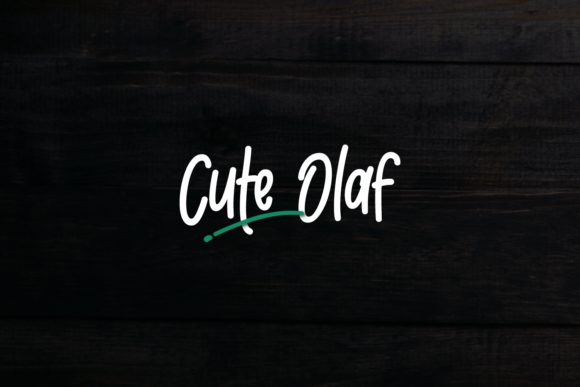
Cute Olaf: A Whimsical, Icy Script Font for Playful Design Projects
Cute Olaf is an icy, frozen, and cool script font—designed with lightness, charm, and a subtle sense of motion. It’s not a formal calligraphy face nor a tightly kerned display type; instead, it occupies a thoughtful middle ground between hand-drawn spontaneity and digital polish. Its letterforms feature gentle tapering strokes, soft joins, and delicate flourishes that evoke frost patterns on glass or sugar swirls on a cupcake. The name “Cute Olaf” nods to its personality: friendly, unpretentious, and quietly expressive—not loud, but memorable.
What Sets Cute Olaf Apart From Other Whimsical Scripts
Many script fonts aim for elegance, nostalgia, or bold energy—but Cute Olaf prioritizes approachability without sacrificing visual cohesion. Unlike highly connected scripts that can blur at small sizes, Cute Olaf maintains modest spacing and clear character separation, supporting readability in moderate-scale applications like greeting cards or social media graphics. Its lowercase “a,” “g,” and “y” include open, rounded forms rather than tight loops, reducing visual clutter in longer phrases. Uppercase letters retain a relaxed rhythm, avoiding the rigid symmetry common in more structured brush fonts.
This balance makes Cute Olaf distinct from both ultra-casual handwritten fonts (which often sacrifice consistency across weights or characters) and tightly engineered decorative scripts (which can feel overly precise or sterile). It’s neither “too cute” nor “too cool”—it lands where warmth and restraint meet.
Fitness for Purpose: Where Cute Olaf Excels
Cute Olaf performs best in contexts where tone matters as much as legibility—especially projects rooted in lighthearted storytelling, seasonal themes, or gentle branding. Think: artisanal bakery packaging, baby shower invitations, boutique skincare labels, or illustrated children’s book chapter headings. Its icy aesthetic supports winter, snow, mint, or pastel palettes without forcing thematic alignment—it’s versatile enough to pair with warm gold foil or deep navy backgrounds, depending on execution.
In practice, designers report success using Cute Olaf for short-form text: product names (“Frostberry Meringue”), event titles (“Winter Solstice Soirée”), or taglines (“Made with a little chill”). It holds up well in SVG or variable font implementations when exported with clean vector paths, and its OpenType features—like discretionary ligatures and contextual alternates—add nuance without requiring manual glyph swapping.
Tradeoffs to Consider Before Choosing
Cute Olaf isn’t built for dense body copy, interface labels, or accessibility-critical environments. Its low contrast and fluid stroke modulation reduce legibility below 16px in most settings, especially on lower-resolution screens or busy backgrounds. It also lacks extended language support beyond basic Latin characters—so multilingual branding or global campaigns may require pairing with a robust sans-serif fallback.
Another practical limitation: Cute Olaf is optimized as a single-weight display font. While some users layer it with light shadows or subtle outlines to simulate weight variation, it doesn’t offer optical sizing or true bold/italic variants. That means typographic hierarchy must be achieved through scale, color, spacing, or companion fonts—not internal font weight shifts.
For projects demanding strict WCAG compliance—such as public-facing educational materials or government-adjacent communications—Cute Olaf should remain a decorative accent, not a primary text driver.
How Cute Olaf Compares With Broader Script Categories
When evaluating script fonts, designers often group options by construction method: brush-based, pen-drawn, digitized handwriting, or geometrically stylized. Cute Olaf falls into the last category—but with organic inflection. It shares structural logic with fonts like Quicksand or Playfair Display Script (in terms of measured rhythm), yet avoids their formality through irregular baseline shifts and asymmetric terminals.
Compared to popular brush scripts like Great Vibes or Dancing Script, Cute Olaf offers tighter spacing control and fewer dramatic ascenders/descenders—making it easier to align within constrained grids or responsive layouts. Unlike many free handwritten fonts, it includes consistent punctuation, numerals with proportional height, and balanced kerning pairs out of the box—reducing time spent on manual adjustments.
It’s also less “trend-dependent” than ultra-narrow condensed scripts currently popular in minimalist branding. Cute Olaf avoids extreme thinness or exaggerated slant, which helps it age gracefully across design iterations.
Realistic Pairings and Practical Implementation Tips
Cute Olaf works well alongside neutral, humanist sans-serifs—think Inter, Manrope, or IBM Plex Sans. These pairings create contrast without competing: the script supplies voice and texture; the sans-serif delivers clarity and structure. For print, use a 1.4–1.6 line-height with Cute Olaf at headline size, then drop to a 1.2 ratio for supporting text in the companion font.
On digital platforms, test rendering across browsers—especially Safari and older Android WebView versions—where hinting and subpixel antialiasing can affect stroke fidelity. Exporting as WOFF2 with pre-hinted outlines improves consistency. If embedding via CSS, declare fallbacks explicitly: font-family: "Cute Olaf", system-ui, -apple-system, sans-serif;
One underused strength: Cute Olaf’s lowercase “i” and “j” have charming dot treatments—small circles with faint outer glow—that subtly reinforce its icy motif. When used sparingly in logos or monograms, those details become signature touches rather than gimmicks.
When You Might Choose Something Else
If your project centers around high-energy youth culture—think music festival posters or streetwear branding—Cute Olaf’s calm demeanor may feel misaligned. Fonts with sharper angles, higher contrast, or kinetic rhythm (e.g., certain bounce-heavy brush scripts or modular scripts) would better match that energy.
Similarly, if you’re developing a long-form editorial site, e-commerce platform, or SaaS dashboard, Cute Olaf shouldn’t serve as a UI font—even as a heading. Its stylistic intent doesn’t extend to functional typography. In those cases, evaluate dedicated UI-friendly script accents or reserve Cute Olaf for micro-moments: loading states, empty-state illustrations, or celebratory banners.
Finally, budget constraints matter. While Cute Olaf is available through several reputable foundries, licensing models vary—some include web-only, desktop-only, or extended-use tiers. Always verify permitted usage scope before integrating into client work or commercial products.
Making an Informed Choice
Selecting a script font involves more than liking how it looks. It’s about understanding how it behaves across mediums, how it scales with your content strategy, and whether its personality reinforces—or distracts from—your message. Cute Olaf stands out for designers who value subtlety over spectacle, cohesion over chaos, and quiet charm over forced whimsy.
It won’t solve every typographic challenge. But when matched to the right context—seasonal branding, gentle illustration-led layouts, or emotionally resonant short-form messaging—it adds tonal precision that few scripts deliver so consistently. Try it in low-stakes mockups first: apply it to a real headline, adjust tracking by ±10 units, and observe how the rhythm changes. That hands-on testing reveals more than any spec sheet ever could.
Ultimately, Cute Olaf is a tool—not a solution. Its value emerges not in isolation, but in thoughtful combination: with color, space, image, and intention. Used deliberately, it becomes part of a larger visual language—one that feels handmade, heartfelt, and just a little bit frost-kissed.