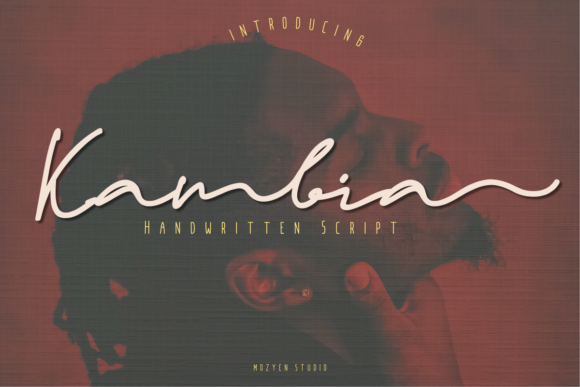
Kambia: A Handwritten Script Font That Fits Real Creative Workflows
Kambia is a lovely and unique handwritten script font—designed with natural rhythm, subtle contrast, and expressive character connections. It’s not just decorative; it’s functional. Whether you’re finalizing a wedding invitation suite, refining a brand’s visual identity, or adding warmth to a digital course landing page, Kambia bridges intention and execution. Its value lies not in how it looks in isolation, but how it integrates into your existing process—before design begins, during refinement, and after delivery.
Where Kambia Fits in the Creative Process
Fonts are rarely chosen in a vacuum. They respond to strategy, audience expectations, and production constraints. Kambia enters most workflows at the *refinement* stage—not as the first choice, but as the right choice once tone, purpose, and context are clear. For example, a small business owner drafting a new logo might start with clean sans-serifs for clarity and scalability. Only after establishing core messaging and emotional intent does Kambia become relevant: “Does this feel personal? Does it reflect care, craftsmanship, or celebration?” That question triggers its use—not before.
It also plays a role in *preparation*. Designers building reusable brand kits often include Kambia as a secondary script option—paired with a neutral primary typeface—for moments that require emphasis, intimacy, or distinction. This isn’t about decoration; it’s about having a consistent, high-quality tool ready when human connection matters more than neutrality.
Practical Use Cases—and When to Reach for It
Kambia shines where authenticity and warmth elevate meaning. Here’s how it functions across real scenarios:
- Wedding invitations: Used for names, dates, or short phrases—not full body text. Its legibility holds up well in print at 18–24pt, especially on textured cotton or matte paper. Test spacing early: tracking adjustments of +10 to +20 units often improve readability without sacrificing flow.
- Logos and wordmarks: Works best for businesses with artisanal, lifestyle, or service-based positioning—think boutique studios, wellness coaches, or handmade goods brands. Pair it with a simple geometric sans-serif for balance (e.g., Inter or Manrope) and avoid stacking it with other scripts.
- Digital signatures and email closings: Embedded as web font (WOFF2) via modern CSS, Kambia adds polish to branded email templates or client-facing dashboards. Use it sparingly—once per message—to reinforce voice without slowing load time.
- Social media assets: Ideal for quote graphics or limited-edition announcement banners. Because its OpenType features include alternate characters and ligatures, enable
font-feature-settings: "ss01", "ss02"in CSS to access stylistic variants that prevent repetition in short headlines.
Integration with Tools and Platforms
Kambia works seamlessly with common design and development tools—but compatibility depends on how you implement it. In Figma or Adobe Illustrator, install the desktop version (.otf) for precise vector control and kerning adjustments. For web use, host the WOFF2 file on your own server or use a reliable CDN; avoid third-party font services that may throttle requests or lack support for advanced typographic features.
If you’re using WordPress, pair Kambia with a lightweight typography plugin like WP Google Fonts (for self-hosted versions) or enqueue it manually via wp_enqueue_style(). Avoid loading it globally—only apply it to specific CSS classes like .signature-line or .invitation-title. This keeps performance tight and prevents unintended inheritance.
For Canva users: upload Kambia as a custom font (Pro required). Once added, save it to your Brand Kit. That ensures consistency across team members and future templates—no last-minute swaps or licensing confusion.
Workflow Tips for Consistent, Efficient Use
Adopting Kambia isn’t about adding complexity—it’s about reducing decision fatigue later. These habits help:
- Define usage rules upfront: Decide where Kambia appears (e.g., “Only in headlines over 20px” or “Exclusively for client signatures”) and document it in your style guide—even if it’s one paragraph in a Notion doc.
- Pre-test pairing: Before committing to a layout, set a sample sentence in both your primary font and Kambia side-by-side. Adjust line height, letter spacing, and weight contrast until hierarchy feels intentional—not accidental.
- Batch export variations: If designing multiple invitation versions (e.g., for RSVP cards, menus, signage), generate all Kambia-based assets in one session. That avoids minor inconsistencies in baseline alignment or stroke weight across files.
- Check color contrast early: Kambia’s thin strokes can fade against light backgrounds. Verify contrast ratios (at least 4.5:1 for text under 18pt) using browser dev tools or Stark plugin—especially for digital use.
Long-Term Usability and Quality Control
A font used repeatedly needs to hold up over time. Kambia’s design supports longevity: its OpenType features include standard and discretionary ligatures, small caps, and contextual alternates—all accessible in professional apps. But long-term success depends less on the font itself and more on how you manage it.
Store the license file and version number with your core brand assets. Revisit usage annually: does Kambia still reflect your current voice? Has audience feedback indicated it reads as “too formal” or “not distinctive enough”? Small shifts in perception matter more than aesthetic trends.
Also consider fallbacks. If embedding fails on a client’s device, define a graceful CSS fallback stack: font-family: "Kambia", "Brush Script MT", cursive;. This preserves intent without breaking layout.
What to Avoid—So Kambia Stays Effective
Kambia isn’t suited for every situation—and recognizing its limits strengthens your work. Avoid using it for:
- Body copy or paragraphs longer than two lines—its connected forms reduce scanning speed.
- Low-resolution screens or small mobile interfaces (<16px) without testing legibility in context.
- Brands built on precision, authority, or technical rigor (e.g., fintech, legal, engineering) unless paired with strong structural elements to ground it.
- Automated systems that generate dynamic text (e.g., certificates with variable names) unless you’ve validated glyph coverage for international characters or special symbols.
Making Kambia Part of Your Routine—Not Just a One-Off
The most effective integration happens when Kambia moves from “nice to have” to “standard option.” Start by assigning it one recurring role in your workflow: perhaps all client email signatures, or every welcome slide in presentations. Build muscle memory around its spacing, pairing, and export settings. Over time, it becomes automatic—not an extra step, but part of how you deliver clarity with warmth.
That shift reflects deeper workflow maturity: knowing which tools serve function, which serve feeling, and when both are needed. Kambia doesn’t replace planning or strategy—it gives them texture. And texture, when applied with intention, makes work feel human, memorable, and grounded.